Technical SEO Audit Checklist: Four Questions, in Order
 By Prabhav Lamichhane7 min readPublished
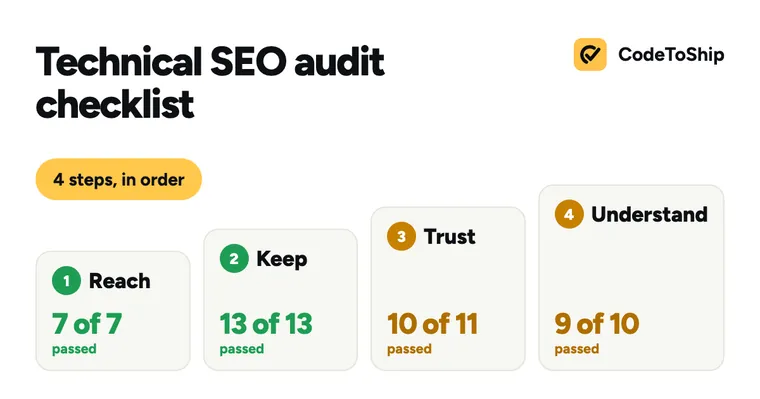
A technical SEO audit checklist is four questions, in order.
- Can Google reach the page?
- Will it keep the page?
- Can it trust the page?
- Does your sitemap point to the right pages?
Next to each is a real result from an audit that ran 41 technical checks on one site. This page goes deep on the technical side only. For all seven areas of an audit, see the website audit checklist.
What are the four questions?
The order is our advice: a page Google cannot reach makes every later question pointless. The results are from our audit of kickoffclock.com on October 27, 2026 (the site belongs to someone on our team). It passed 39 of 41 technical checks.
Can Google reach the page?
How to check
- Type
yourdomain.com/robots.txtin your browser. UnderUser-agent: *, a line that saysDisallow: /tells every crawler to stay away. - Type the
http://address. It should land on thehttps://page in one step. - Type an address that does not exist. You should see a page-not-found page, and your browser tools should show a 404 status.
A pass: The file exists, allows the page and lists the sitemap. The page opens in at most one redirect. A missing address answers 404.
Our example site passed 7 of 7
The 7 checks in this step
- The site has a robots.txt
- robots.txt allows this page
- robots.txt lists a sitemap
- Stylesheets and scripts can be crawled
- Missing pages answer with a proper 404
- The page is reached in at most one redirect
- Redirects are permanent
- Type
Will Google keep the page?
How to check
- Open the page, press Ctrl+U (Cmd+Option+U on a Mac) and search for
noindexandcanonical. - Type the address with www and without it. Both should lead to one version.
- In Search Console, paste the address into the top bar and read whether the page is on Google.
A pass: No noindex. The canonical points to the page itself. The text you can read on the page is also in the source.
Our example site passed 13 of 13
The 13 checks in this step
- Page can be indexed
- Links can be followed
- Has a canonical URL
- The canonical URL is sound
- The canonical agrees with indexing
- The www and bare addresses lead to one version
- The HTML is a sensible size
- The content is in the HTML
- No limits on how the page appears in results
- The page names itself as the one to keep
- The address is a sensible length
- The address is clean
- Trailing slashes are used consistently
- Open the page, press Ctrl+U (Cmd+Option+U on a Mac) and search for
Can visitors and Google trust the page?
How to check
- Look at the padlock in the address bar. Click it and check the certificate is valid and when it ends.
- Open your browser tools, go to the Network tab, click the page and read the response headers.
- Look for
Strict-Transport-Security,X-Content-Type-Options,Referrer-Policy,Permissions-PolicyandContent-Security-Policy.
A pass: The padlock is closed, nothing on the page loads over http://, and the five headers are there. Our check wants Strict-Transport-Security set for at least a year.
Our example site passed 10 of 11
What it found: The rules for which scripts may run only report, they do not block.
The site has a Content-Security-Policy in report-only mode, so browsers tell the site about scripts and files that break the rules but still run them. Injected scripts are not stopped yet.
The fix: Read the reports and note every file your site needs that is flagged. Add those hosts to the rule. When nothing you need is flagged any more, rename the header from Content-Security-Policy-Report-Only to Content-Security-Policy.
The 11 checks in this step
- Served over HTTPS
- The certificate is valid and not close to expiring
- http:// leads to https://
- No insecure resources on the page
- HSTS is set for at least a year
- The rules for which scripts may run only report, they do not block
- MIME sniffing is switched off
- Has a Referrer-Policy
- Framing is controlled
- Has a Permissions-Policy
- No version numbers in the server headers
Does your sitemap point to the right pages?
How to check
- Open
yourdomain.com/sitemap.xml. It should be a list of addresses, not an error. - Open ten of the addresses. Each should work and be the final https address, not a redirect.
- Check that the page you are auditing is in the list, and that no listed page is marked noindex.
A pass: The file is valid and within Google's limits. Every address you test works. The dates are real.
Our example site passed 9 of 10
What it found: The sitemap uses priority and changefreq.
Google ignores these tags. They add weight to the file and suggest control you do not have.
The fix: Delete the priority and changefreq lines from every entry in the sitemap. If a plugin or tool builds the sitemap, turn off its priority and changefreq option or ask your developer to remove them.
The 10 checks in this step
- Sitemap found at https://kickoffclock.com/sitemap.xml
- The sitemap is valid
- The sitemap is within limits (8855 addresses)
- The 10 addresses tested all work
- The sitemap lists final https addresses
- The page is listed in the sitemap
- Dates look genuine
- The sitemap uses priority and changefreq
- The 5 pages read are not marked noindex
- The sitemap lists the preferred address of each page read
- Open
What limits does Google set?
Four facts from Google's own pages (status checked November 3, 2026):
- robots.txt: Google reads the first 500 KiB. “Content which is after the maximum file size is ignored.”
- Sitemap: one file holds up to 50 MB uncompressed or 50,000 addresses. Our example had 8,855.
- Sitemap tags: “Google ignores priority and changefreq values.” It uses the lastmod date only if it is consistently accurate.
- Redirects: a permanent redirect makes the new address the one shown in results. A temporary one keeps showing the old address.
In what order should you fix things?
This is our advice, not a rule. Fix in the order of the four questions, and end with a list, not a score.
- Anything that stops Google reaching the page.
- Anything that stops Google keeping it, such as a noindex or a wrong canonical.
- Missing security headers and rules that only report.
- Sitemap tidying.
The example site had two findings, both low severity: one in the third question and one in the fourth. Nothing blocked the page, so nothing needed fixing before the rest.
What does a tool find that you will not?
Three checks from the same audit that take a while by hand:
- Testing a sample from the sitemap. The audit opened 10 addresses from a list of 8,855 and checked each one worked.
- Reading the headers. It checked that MIME sniffing is off and that no version numbers show in the server headers. Neither is visible on the page.
- Comparing the canonical with indexing. It checked that the canonical address and the indexing rules agree with each other.
Questions about a technical SEO audit
How often should you run a technical SEO audit?
After every redesign, move or plugin change, and about once a quarter otherwise. That is our advice, not a rule from Google.
Do you need a crawler?
For one page, no. The four checks above work by hand with a browser and Search Console. For a site with thousands of pages, a tool saves the hours and runs every check the same way.
What about sites built with JavaScript?
Our audit checks that the page's text is in the HTML it receives. For anything deeper, use the live test in Search Console's URL inspection, which shows the page as Google renders it.
Is a score enough?
No. A score says how well a site did, not what to fix first. The order we use is in the section above.
Want the checks run for you?
The free audit checks one page, including these technical checks, and shows the score, the counts and the first fixes. Paste any web address.
Sources and how the example was made (status checked November 3, 2026)
- The audit is our own, of kickoffclock.com, run on October 27, 2026 with Google's speed test. The site belongs to someone on our team. Every count, check and finding above is read from that audit.
- Google Search Central, robots.txt specifications (read November 3, 2026): the 500 KiB limit.
- Google Search Central, Build and submit a sitemap (read November 3, 2026): the 50 MB and 50,000 limits, and the line on priority and changefreq.
- Google Search Central, Redirects and Google Search (read November 3, 2026): permanent and temporary redirects.
- MDN, Content-Security-Policy-Report-Only (read November 3, 2026): report-only mode monitors violations without enforcing the policy.
- eesel, Technical SEO audit checklist (read November 3, 2026): about 23 checks in six steps, with no real site and no target values.
- The order of the questions, the fix order, how often to audit and the hand checks are our own advice.