Website Audit Checklist: What to Check, and in What Order
 By Prabhav Lamichhane5 min readPublished
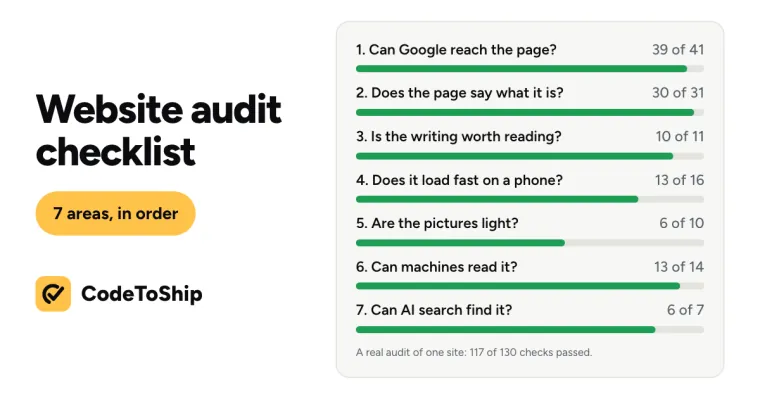
A website audit checklist has seven areas. Check them in the order below.
- About an hour by hand
- What a real site scored, from an audit that ran 130 checks on one page
What are the seven areas, and in what order?
The order is our advice: what stops a visitor or Google comes first. The results are from our audit of kickoffclock.com on October 27, 2026 (the site belongs to someone on our team). It passed 117 of 130 checks.
Can Google reach the page?
How to check: Type
yourdomain.com/robots.txtin your browser. If you see the word Disallow followed by a single slash, Google is told to stay away.A pass: The page opens, and nothing tells Google to stay away.
For the whole technical area, step by step, see the technical SEO audit checklist.
Our example site passed 39 of 41 (Technical SEO)
What it found
- The rules for which scripts may run only report, they do not block
- The sitemap uses priority and changefreq
Does the page say what it is?
How to check: Search for your page on Google. Read the blue title and the text under it.
A pass: The title says what the page is, and the text under it adds something new.
Our example site passed 30 of 31 (On-Page SEO)
What it found
- The icon is smaller than Google recommends
Is the writing easy to read?
How to check: Read the page out loud on your phone. If you run out of breath, the sentence is too long.
A pass: Short paragraphs, and words a customer would use.
Our example site passed 10 of 11 (Content Quality)
What it found
- The writing is hard to read
Does it load fast on a phone?
How to check: Paste the address into PageSpeed Insights and look at the mobile result.
A pass: The main picture or heading shows in under 2.5 seconds.
Our example site passed 13 of 16 (Performance)
What it found
- Mobile performance score is 89 out of 100
- Largest paint takes 2.9 s
- Text can stay invisible while a font loads
Are the pictures light?
How to check: In PageSpeed Insights, look for the pictures it flags.
A pass: No picture over 200 KB, and each one has a short description for people who cannot see it.
Our example site passed 6 of 10 (Images)
What it found
- 2 images heavier than they should be
- 6 images without width and height
- 7 images further down the page not lazy loaded
- 6 large images that do not adapt to the screen
Can machines read what the page is about?
How to check: Paste the address into Google's Rich Results Test.
A pass: It finds your business details and shows no errors.
Our example site passed 13 of 14 (Schema / Structured Data)
What it found
- The preview of this page when shared is incomplete
Can AI search find it?
How to check: Open
yourdomain.com/robots.txtagain and look for the names of AI crawlers.A pass: The ones you want are allowed.
Our example site passed 6 of 7 (AI Search Readiness)
What it found
- No paragraph of 100 to 170 words under a heading
What should you check in the first ten minutes?
This is our advice, not a rule. Do these three before the rest of the list.
- Open robots.txt. If it says Disallow: / for everyone, Google is told to stay away from the whole site. Nothing else on the list matters until that is fixed.
- Run PageSpeed Insights on the home page. Read the mobile score and the largest item. A slow home page is the one problem every visitor feels.
- Search your own business name. If your site is not the first result, look at Search Console before you change anything else.
What does a tool find that you will not?
Two items from the same audit that are hard to see by eye:
- 6 images without width and height. The page looks fine, but it jumps while it loads.
- 2 of 30 font rules with no loading rule. Visitors on a slow connection may see no text for a moment.
Nine of the 13 findings were low severity. Fix the four medium ones first. The rest can wait for the next pass.
Questions about a website audit checklist
How long does a website audit take?
By hand, about an hour for one page. That is our estimate, not a measured figure. Our tool took about 41 seconds for the example site.
Does the checklist cover accessibility?
No. Our audit has no accessibility area, so this list has none either. Ahrefs's checklist does include it, and it is worth a separate pass.
Do I need a tool to audit a website?
No. The seven checks above work by hand with free tools. A tool saves the hour and runs the same checks the same way every time.
What do I do with the result?
Fix the biggest items first, then send the rest to whoever builds the site. If you are reporting to someone else, the SEO report for a client guide shows how to write it in plain words, and the SEO audit report template has the six parts.
Want the checks run for you?
The free audit checks one page across these areas and shows the score, the counts and the first fixes. Paste any web address.
Sources and how the example was made (status checked November 2, 2026)
- The audit is our own, of kickoffclock.com, run on October 27, 2026 with Google's speed test. The site belongs to someone on our team. Every count and finding in the list is read from that audit.
- Ahrefs, Free Website Audit Checklist (read November 2, 2026): 27 issues in five categories, including accessibility and data privacy, tied to its own crawler. It audits no real site.
- ThePixel, Website Audit Checklist (read November 2, 2026): 18 items in technical, content and design lists. It audits no real site.
- The order of the areas, the first ten minutes and the hour for a hand check are our own advice and estimate.