SEO Audit Report Template: The 6 Parts, With a Real Example
 By Prabhav Lamichhane11 min readPublished · Updated
An SEO audit report is the page you send a business after you have looked at its website.
- How the site does
- What is wrong
- What to fix first
Below is an SEO audit report template with six parts, what to write in each, and the real lines from one report we made, so it works as an SEO audit report sample you can follow. The full sample is free to download.
A real SEO audit report example
The template below is filled in with this one. It is the top of a website audit report we made on October 27, 2026 for kickoffclock.com. It is our own audit, run by our own tool, so it is the real output and not a drawing. The site belongs to someone on our team, which is why we can show it.
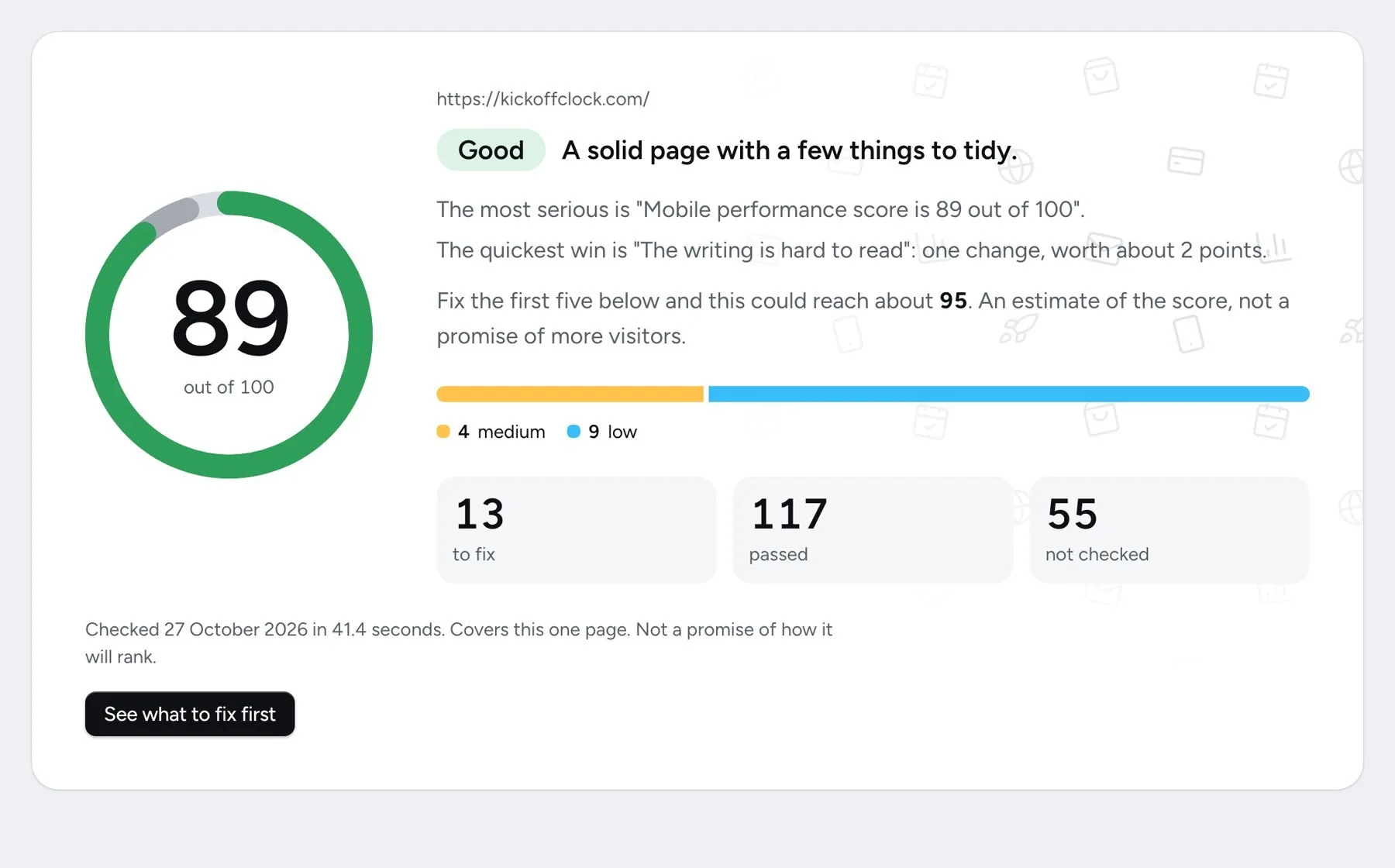
The PDF is the whole report, 18 pages, with the same numbers.
Want to compare designs? See three report designs and four pitch decks as PDFs.
Part 1
The score, the grade and one sentence
Start with a number out of 100 and one word for it, such as Poor, Needs work, Good or Strong. Then one sentence that a business owner can repeat to someone else. This is the only part some readers will see.
From the real report
89 out of 100. Good. A solid page with a few things to tidy.
Under it, the report says what the number covers: "Covers this one page. Not a promise of how it will rank."
What to write
- The number and the word together, so the number is never alone.
- What it covers: one page or a whole site, and the date.
- No promise about rankings or visitors. A score is a check on the page, not a forecast.
Part 2
The one thing that matters most
Name the single most serious problem, in words the owner uses. Do not start with a list. If the page has a problem that stops it showing in search at all, it goes here, above everything else.
From the real report
The most serious is "Mobile performance score is 89 out of 100". The quickest win is "The writing is hard to read": one change, worth about 2 points.
On a weaker page the same part reads differently. On another audit we ran, of a test page, the first line was: "This page asks search engines not to index it, so it cannot appear in search results." That is the line a business owner remembers. If you want to understand that problem yourself, read how Google treats a page told not to be indexed.
What to write
- Two sentences at most: the most serious problem, then the quickest win.
- Say what it means for the business, not what the setting is called.
Part 3
A fix-first list, in order
Give five items, not fifty. For each, a plain title, how serious it is and how many points of the score it is worth. The reader can start at the top and stop when they have had enough.
From the real report
The five items on the fix-first list of the real report # Finding Area Severity Points 1 Mobile performance score is 89 out of 100 Performance Medium 1 2 Largest paint takes 2.9 s Performance Medium 1 3 2 images heavier than they should be Images Medium 0.7 4 6 images without width and height Images Medium 0.7 5 The writing is hard to read Content quality Low 2.1 The full report had 13 things to fix. It shows five up front, because five is a list a person will actually do.
What to write
- The most serious first, then the quickest wins.
- A severity word with every item, so color is never the only signal.
- The points, so the owner can see what each fix is worth.
Part 4
The score for each area
A single number hides where the trouble is. Break it into areas, and say how much each area counts. A weak area that counts for little should not scare anyone.
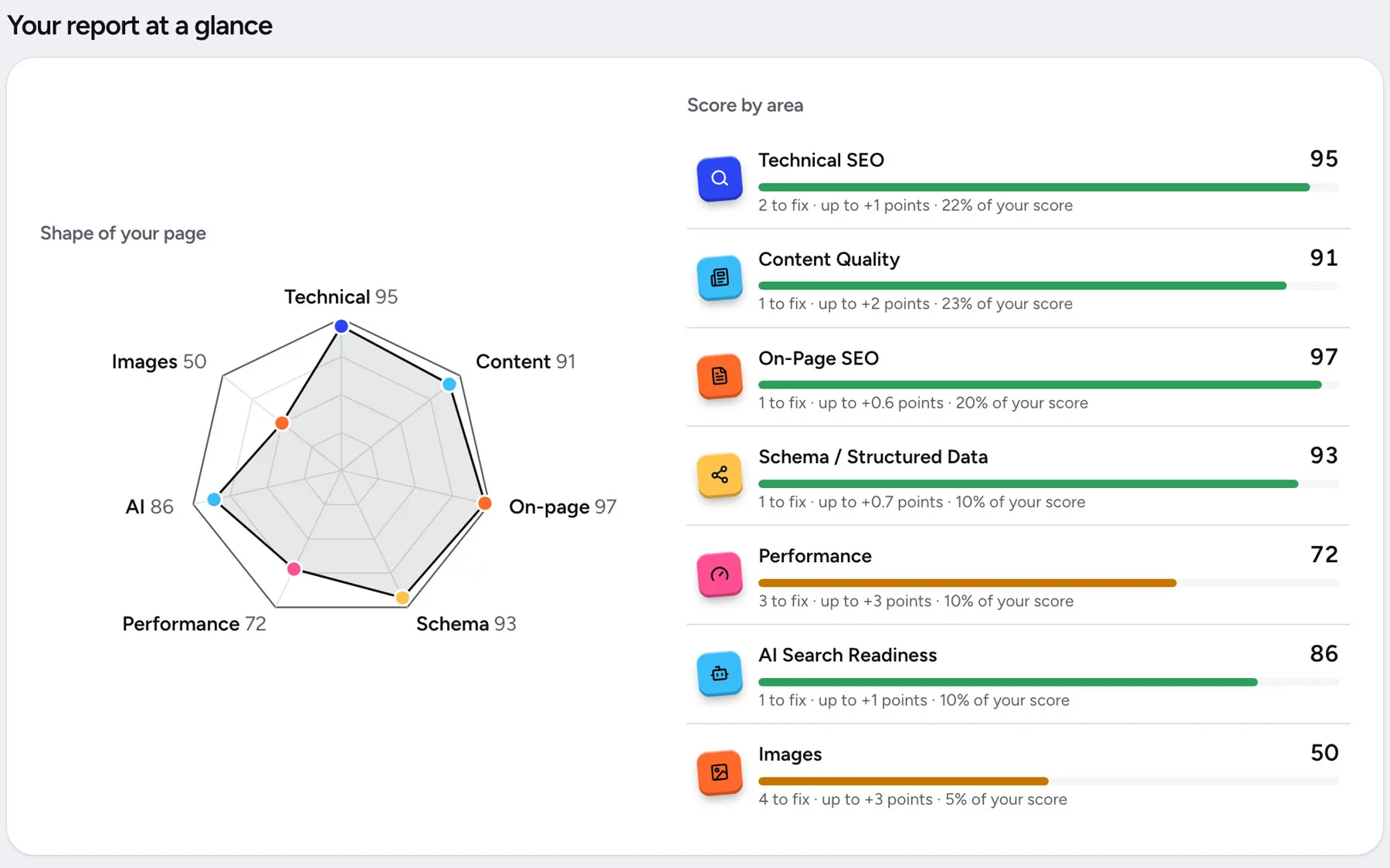
The same report, by area. The shape on the left shows at a glance where the page is weak. From the real report
Score and share of the total for each area of the real report Area Score Share of the total Technical SEO 95 22% Content quality 91 23% On-page SEO 97 20% Schema / structured data 93 10% Performance 72 10% AI search readiness 86 10% Images 50 5% Images scored lowest at 50, but they count for only 5% of the total. Performance, at 72, counts for 10%.
What to write
- Every area with its score and its share, in the same order every time.
- One line on the weakest area that matters.
Part 5
The evidence for each finding
Under every finding, say how it was checked and what to do about it. This is what makes the report believable. A client who disagrees can see exactly what you looked at, and a developer can fix it without asking you.
From the real report
6 images without width and height (Images, Medium, 0.7 points)
How it was checked: Looked for numeric width and height attributes on each content image.
What to do: Add the real pixel width and height to every
imgtag listed above, for example<img src="team.webp" alt="The team" width="1200" height="800">.What to write
- One line on how it was checked.
- The fix in steps a person can follow, with an example to copy.
- A note when a finding might not apply, so nobody changes something on purpose.
Part 6
One next step
End with one thing to do. A report that ends with ten options gets no reply. Say what you suggest, and what you will do if they say yes.
From the real report
Fix the first five below and this could reach about 95. An estimate of the score, not a promise of more visitors.
What to write
- A single action: reply, book a call, or approve the first five fixes.
- An honest estimate. If you promise more visitors, you own that number.
How to read the fix-first list, one finding at a time
The list in part 3 is the audit's order. Your order of work can differ. Below are the five findings from the real report, read the way you would read them before you write to a client: what the audit said, what it means, and what to do first. The wording of each "audit says" line is the report's own.
Finding 1 · PF-01
Mobile performance score is 89 out of 100
- The audit says
- Google's lab test of this page on a mid-range phone and a slow connection scored it below 90.
- What it means
- A result, not a cause. It says the page could be faster. It does not say why.
- Do first
- Do not fix this line directly. Fix the causes in findings 2, 3 and 4, then run the test again and see where the number lands.
Finding 2 · PF-02
Largest paint takes 2.9 s
- The audit says
- The biggest thing on the screen, usually a photo or a heading, appears late. Google wants this within 2.5 seconds.
- What it means
- The visitor waits 2.9 seconds before the main thing on the page shows up.
- Do first
- Find out which item it is. If it is a photo, resize it and save it as WebP or AVIF, as the audit's fix says. That is the same job as finding 3.
Finding 3 · IM-03
2 images heavier than they should be
- The audit says
- The worst is a content image at 354 KB, over the 200 KB the audit allows for one. Heavy images are the most common reason a page loads slowly.
- What it means
- Two photos are bigger in file size than they need to be, so the page has more to download.
- Do first
- Start here. The audit counted the file sizes itself, and this is the likeliest cause of findings 1 and 2. Resize each photo to the largest size it is shown at, save it as WebP at about 75 to 80 percent quality, and look at the page again.
Finding 4 · IM-05
6 images without width and height
- The audit says
- The browser cannot reserve space before they load, so the page jumps as they appear.
- What it means
- Text and buttons move down when a photo arrives. A visitor who is about to tap something taps the wrong thing.
- Do first
- Check it yourself before you tell the client. The audit reads the width and height attributes. A size set in a stylesheet cannot be seen, so open the page on a phone and watch whether it jumps. If it does, add the real width and height to each image.
Finding 5 · CT-03
The writing is hard to read
- The audit says
- The Flesch reading score is 41. The audit calls 60 to 70 plain English.
- What it means
- Long sentences and long words make the page tiring to read for most visitors.
- Do first
- Low severity, but the report lists it as the quickest win: one change, worth about 2 points. Rewrite the longest paragraphs first, aiming for about 15 words a sentence. It does not need a developer.
Notice what the order does. The two speed lines are results. The two image lines are causes. When you fix the causes first, the results move by themselves. Then run the same audit again and put the two scores side by side. The real report estimated that fixing its first five could reach about 95. That is an estimate of the score, not a promise of more visitors.
To turn these five findings into one page the owner will read, see the guide to an SEO report for a client. For the checks behind each one, see the technical SEO audit checklist.
How to write a finding for a business owner
Most findings come out of a tool in the tool's words. Say what it means for a person who has never heard of the setting.
Tool words
Largest Contentful Paint 2.9 s.
Plain words
The biggest thing on your page, usually a photo, takes 2.9 seconds to show on a phone. Google asks for 2.5 seconds or less (web.dev).
Tool words
Meta robots: noindex.
Plain words
This page asks search engines not to index it, so it cannot appear in search results.
What to leave out
- A list of every check. The real report passed 117 checks and found 13 things to fix. Show the 13. Give the 117 as a count.
- Checks you did not run. Do not hide them. The real report says "55 not checked" on its first screen, so nobody thinks the page was cleared of them.
- Findings you would leave alone. A page that is meant to stay out of search should not be told to appear in it.
- Promises about rankings. Say what you checked. Do not say what Google will do.
Audit report, monthly report or pitch deck?
- The audit report is the whole look at one site, as in this guide. Send it when you want the first conversation.
- The monthly report is the same audit run again, set against last month. Send it to keep the work visible once someone is a client.
- The pitch deck is only the top findings, a few slides, for a meeting where nobody will read eighteen pages.
Questions about SEO audit reports
What should an SEO audit report include?
Six things: a score with a grade word and one sentence, the most serious problem, a short fix-first list, the score for each area, the evidence for each finding, and one next step. Each is a part above, with a line from the real report.
How long should an SEO audit report be?
As short as the reader needs, and no shorter than the evidence. The top of our real report answers the question in four lines. The full PDF is 18 pages, for the developer who will make the changes. Put the answer first and keep the rest as the back of the report.
Is there a free website audit report template or sample?
Yes. The sample report (PDF) on this page is a complete 18-page SEO audit report example, made from a real audit of kickoffclock.com. It is free to download, with no sign-up.
What is the difference between an audit report and a monthly report?
An audit report is the first full look at a site. A monthly report is the same audit run again and set against last month, so a client can see what changed.
Make a report like this for any website
The free audit checks one page and gives you the score, the counts and the first fixes, the same shape as the report above. Paste any web address and try it on your own site first.
Found a problem with a small icon in Google? The guide to a website logo not showing in Google shows how a single finding is written as steps.
Sources and how the example was made
- The example report is our own audit of kickoffclock.com, run on October 27, 2026 with Google's speed test. The site belongs to someone on our team. The numbers and the quoted lines are the report's own.
- The line about a page told not to be indexed comes from another audit we ran, of a test page. It is the wording our report uses for that finding.
- Google Search Central, Block Search indexing with noindex
- web.dev, Largest Contentful Paint (LCP) (2.5 seconds or less counts as good)