Website Redesign SEO Checklist
 By Prabhav Lamichhane8 min readPublished · Last checked
A new design can quietly undo what the old site earned in search.
- Before launch: record what you have
- Launch day: switch off testing settings, then redirect
- After: compare and watch
The usual cause is a setting left over from testing, not the design.
Save what the old site says, remove every testing block on launch day, then check the same things again. If your redesign also changes addresses, it is a small SEO migration, and the same steps apply. You can run the free audit on the old home page now and on the new one after launch.
Before launch
Launch day
After
The website redesign checklist, in three stages
The steps follow Google's two pages on moving a site. Where a step is our own advice, it says so.
Before launch: record
List every old address. Use the sitemap, the busiest pages, the CMS, server logs and the Links report in Search Console. Include images and PDFs.
Save what each key page says. Title, description and main heading, for the pages that bring visitors or calls. Our advice: keep them in one sheet.
Audit the old home page. Run the free audit and save the report. You will run it again after launch.
Map old addresses to new ones. Where a page goes for good, plan a 404 or 410, not a redirect to the home page.
Give each new page its own canonical tag. It points to the page's own new address. Update the links inside the site too.
Keep the test copy out of search, and write down how to undo it. A noindex tag is the usual way. The undo step is the one people forget.
Launch day: switch off, then redirect
Remove every testing block. The noindex tag, the robots.txt Disallow line, and in WordPress the Discourage search engines box. Google lists this mistake first.
Turn on permanent redirects. Use 301 or 308, each straight to the final address, never through a chain.
Test a sample of old addresses. Google says to test the redirects. Our advice: start with ten, the busiest first. Each should land on the right new page in one step.
Submit the new sitemap, drop the old one. Change of Address is only for a new domain or subdomain, not for a new design on the same address.
Audit the new home page. Run the free audit and set it beside the old report.
After: compare and watch
Compare the two reports. Anything that got worse is the first thing to look at.
Watch Search Console, not only the ranking. Check the sitemaps and search queries reports. The old sitemap showing fewer indexed pages over time is expected.
Redirect what you missed. Any old address that shows an error and has a new home gets a redirect.
Keep the redirects for at least a year. That is Google's advice. Taking them out early breaks old links.
Wait before changing more. Google says results can shift, and a medium-sized site can take weeks. Do not redo the content the same week.
The three settings to switch off on launch day
A test copy is kept out of search on purpose. Each setting is on while you test and has to be off the day you launch.
The noindex tag
In the page's head, or in the X-Robots-Tag header
The robots.txt Disallow line
yoursite.com/robots.txt: Disallow: /
Discourage search engines
WordPress, under Settings, Reading
Map every old address before you redirect
Think of the post office when you move house. You give it your new address so your mail still reaches you. A redirect does that for a web page: the old address forwards visitors, and Google, to the new one. A map is the list you make first, so no page is forgotten.
List every old address. A spreadsheet with three columns works: old address, new address, what to do.
Ask one question about each address: is there a page on the new site that does the same job?
Pick one of four answers: moved, merged, removed or unchanged. The examples below show each one. The addresses are made up.
The page has a new address. Anyone who asks for the old one is sent to the new one, Google included.
Two old pages became one new page. Send both to it.
Nothing replaces it. Let the address say so, instead of sending people to a page they did not ask for.
Same address before and after. Nothing to do except open it once and check it still works.
The mistake to avoid: sending every old page to the home page. Visitors land somewhere that is not what they asked for, and Google treats it as a poor match.
The numbers are the answer your server gives. 301 means "moved for good". 404 means "not found" and 410 means "gone on purpose". Google also accepts 308 as a permanent redirect.
A real run: the same page, audited three times
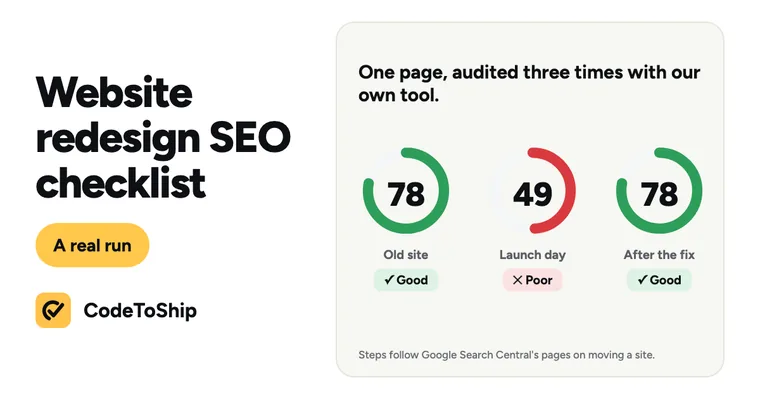
We built the page of a made-up plumber, Calder Plumbing, and ran our own audit on it as the old site, as a redesign launched with the usual mistakes, and after the fix. The numbers are what our full audit printed for one page, with no speed test. The free audit shows less: the score, the grade and the first three fixes.
Old site
78Good
Before the redesign
3 medium, 14 low
Launch day
49Poor
New design, usual mistakes
1 critical, 1 high, 5 medium, 14 low
After the fix
78Good
Same design, mistakes removed
3 medium, 14 low
In a search result
A drawing of what the findings mean for the page, not a screenshot of Google.
Calder Plumbing · calderplumbing.example
Calder Plumbing | Plumbers in Fairmont
Plumbing repairs, drain cleaning and new fixtures in Fairmont. Call Calder Plumbing for a price before we start.
Calder Plumbing · calderplumbing.example
Home
No description.
Asks to be kept out of search results
What dropped the score from 78 to 49
These four findings appeared on launch day and were gone after the fix. The other 3 medium and 14 low findings were the same in all three runs, so they are left out.
When robots.txt blocks everything
We also tried a launch with the robots.txt line that blocks every crawler. The audit gave no score. It stopped with this message:
That site's robots.txt does not allow CodeToShipAuditBot to read this page, or it could not be read, so we did not read it.
If a launch-day audit refuses to read your own page, look at robots.txt first.
What to tell the client
Two short messages, one for each outcome. Neither promises a result.
When the launch is clean
"Your new site is live. We checked it against the old one: the title, description and main heading say what they said before, and the page is open to Google. Here are both reports. We will look again in a few weeks."
When you caught a mistake
"On launch day the new site was still telling Google to skip it. We removed that and checked again. The two reports show before and after."
Questions about redesigns and SEO
Do I need redirects if the addresses stay the same?
No. If every page keeps its address, there is nothing to redirect. You still have to remove the testing blocks and check the new pages, because a new design can drop a title or description by accident.
How long until search results settle after a redesign?
Nobody can say for your site. Google says a medium-sized site can take weeks and a larger one longer, and that results can move in the meantime. Plan for that, and do not promise a client a date.
Do I need the Change of Address tool?
Only if the domain or subdomain changes, such as old-name.com to new-name.com. For a redesign on the same domain, it is not used.
Can a free tool run this whole checklist?
Not all of it. The free audit checks one page, so it covers the page-level checks on the home page, before and after, and shows the score, the grade and the first three fixes. It does not read Search Console and does not crawl every address, so the redirect list and the Search Console reports stay manual.
How this check works, and what it cannot see
- The audit reads one page: its robots.txt, the robots meta tag and header, the canonical tag, the title, the description and the main heading, among other checks.
- It does not follow your redirects across addresses, does not crawl every page and does not read Search Console.
- The free audit shows the score, the grade and the first three fixes, and runs no speed test. The runs above show the full audit's output.
- The plumber's page is made up, and the test ran on our own computer. Your site will have different findings.
Run the audit before you launch
Paste the old home page's address into the free audit and save the report. After launch, run it on the new page and compare. To read a report and decide what to fix first, see the SEO audit report template. For the technical checks behind a launch, see the technical SEO audit checklist.
Sources and when they were read
- Google Search Central, How to move a site with URL changes (read November 5, 2026): the address list, the redirect rules, the launch steps, the monitoring reports and the common mistakes.
- Google Search Central, Changing your web hosting and SEO (read November 5, 2026): remove the temporary blocks before the move.
- The three audit runs are our own audit engine on a page we built, run on November 5, 2026. The scores, findings and the robots.txt message are its output.
- The example addresses and the plumber are made up.