Duplicate Without User-Selected Canonical: What It Means and When to Fix It
 By Prabhav Lamichhane9 min readPublished · Last checked
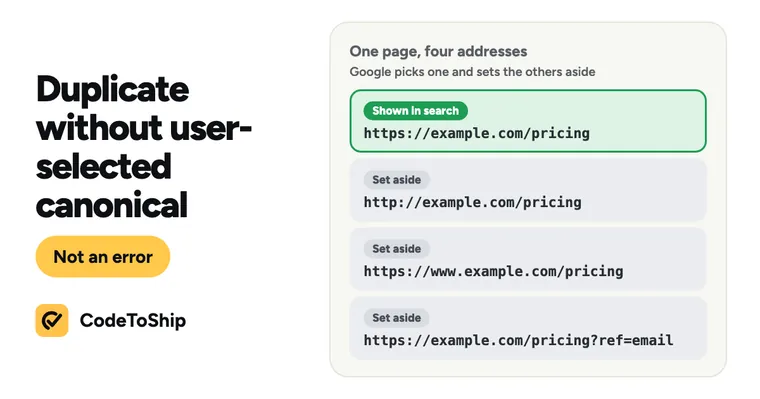
It is not an error. Google found the same content at more than one address and chose one itself.
- Google set the other addresses aside
- Act only if it chose an address you did not want
To see whether a page names its own preferred address, you can run the free audit on it. It checks the page, not Search Console, and the free report lists the first three fixes, so look at the page source too.
What the status means
One page can be reachable at several addresses. When none of them says which one you prefer, Google picks one and sets the rest aside. The set-aside ones get this status. The addresses below are made up.
One page, four addresses
https://example.com/pricinghttp://example.com/pricinghttps://www.example.com/pricinghttps://example.com/pricing?ref=emailShown in search
https://example.com/pricingSet aside: "Duplicate without user-selected canonical"
The other three addresses, because none of them said which one you prefer.Three common causes
A tracking tag on the address. Google's own example is a product page that also loads with a ?gclid= tag on the end. Same page, two addresses.
More than one host name. The same page answers on the www and the non-www address. Google's example is home.example.com and www.example.com.
Both http and https. Google says it prefers the https address when both are equivalent, unless something is wrong with it, such as a bad certificate.
Three look-alike statuses, and which ones are a problem
Search Console has three canonical statuses with similar names. Only one of them is an error. The wording below follows Google's Page indexing report help.
Not an error
Duplicate without user-selected canonical
This page is a duplicate of another page, and you did not declare a preferred one. Google picked a canonical and does not serve this page.
What to do: Inspect the URL to see which page Google chose. If you disagree, declare your preferred address. Otherwise, leave it.
An error, in Google's words
Duplicate, Google chose different canonical than user
You declared a canonical, but Google thinks another address is the better one and indexed that instead.
What to do: Inspect the URL and compare the two. Check the pages are similar enough for your declared canonical to make sense.
Correct setup
Alternate page with proper canonical tag
This page is marked as an alternate of another page, such as a mobile or AMP version pointing to the main one.
What to do: Nothing. Google says the page points to the right canonical.
Check your own page first
Two different questions need two different tools. Mixing them up is the most common confusion with this status.
What did my page declare?
The page source, or the audit
Open the page, view the source and search for canonical. The audit checks it too, but the free report lists only the first three fixes.
It shows: Whether the page names a preferred address, and whether it is a full one.
What did Google pick?
The URL Inspection tool in Search Console
Inspect the address, expand the Page indexing section and read the Google-selected canonical.
It shows: Which address Google chose, which the audit cannot see.
Start with the first one. The page source shows in a minute whether the page names a preferred address at all. The audit checks the same thing. Run the free audit on the page. The audit reads what the page declares. It does not know what Google picked.
Do I need to fix it?
Two questions decide it. To answer the second, open the URL Inspection tool, expand the Page indexing section, and compare "User-declared canonical" with "Google-selected canonical".
Is this a page you want people to find in search?
Leave it. Google setting a duplicate aside is the system working, for example for a tracking-tag address.
Check which address Google chose.
Is the Google-selected canonical the address you want?
Declare your preferred address and keep the signals consistent. The steps are below.
Do nothing. It is already the address you want in search.
How to fix it when Google chose the wrong address
These follow Google's page on specifying a canonical. A canonical link and a redirect are both strong signals, a sitemap is a weak one, and they can stack.
Choose the address you want in search. One address per page. Pick the https one, with or without www, and stay with it.
Declare it on that page. Put a canonical link in the page's head with the full address, starting with https://. On the preferred page it points to itself. Google calls this a self-referencing canonical.
Point the duplicates at it. A duplicate you keep gets a canonical link to the preferred address. A duplicate you are retiring gets a permanent redirect instead, which Google calls a strong signal.
Link to the preferred address. Links inside your site should use the preferred address, not a duplicate.
List only preferred addresses in the sitemap. Google calls a sitemap a weak signal, but it adds to the others.
Wait, then inspect again. Google recrawls on its own schedule. Do not promise a client a date.
Where to make the change
The wording is our audit's own fix text, so the guide and the tool say the same thing.
Any site
Add one link tag to the page's head, with the full https address you want shown in search.
WordPress
Yoast SEO and Rank Math have a Canonical URL field in the Advanced tab of the SEO box.
Shopify, Wix, Squarespace
Set the primary domain in your domain settings. This settles the www and non-www cause.
Cloudflare
Add a redirect under Rules, then Redirect Rules, from the other version of the address.
Two things Google says not to do
- Do not use robots.txt to choose a canonical. Google may still index an address that robots.txt blocks, without its content.
- Do not use noindex to choose one. It blocks the page from search completely.
A real run: what the audit finds on the page
We ran our own audit on the page of a made-up plumber, Calder Plumbing, three times: with no canonical, with a relative one, and with a full one. The text is what the audit printed. It was one page, with no speed test. The free audit shows less: the score, the grade and the first three fixes.
Run 1
The page declares
nothingNo preferred address for this page (Medium). Without one, duplicate versions of this page can compete with each other.
Score 76 out of 100
Run 2
The page declares
href="/"The page's preferred address has a problem (Medium). The canonical is the relative address "/". Search engines may resolve it wrongly.
Score 77 out of 100
Run 3
The page declares
href="https://…/"No canonical finding. The audit passes the canonical as sound.
Score 78 out of 100
The score moved by only two points. That is how much the audit counted these Medium findings on this page, and it fits Google's wording: a canonical is a signal, not a block. The other findings on the page were the same in all three runs.
The audit also has a check for the www cause. When a site answers on both www and non-www without a redirect, it reports "The site answers on both www and non-www" as High. That check was not part of these runs.
What to tell the client
Clients see the word "duplicate" and worry. Two short messages, one for each outcome. Neither promises a result.
When Google chose the right address
"Search Console lists some addresses as duplicates. That is not an error. Google found the same page at more than one address and chose one. For your key pages it chose the address we want, so nothing needs to change."
When it chose the wrong one
"For one page, Google chose an address with a tracking tag on the end. We have named the clean address as the preferred one and will check again in a few weeks."
Questions about this status
Is "duplicate without user-selected canonical" an error?
Google says no. Its Page indexing report help says of this status that it is "not an error, but is working as intended". Google found a duplicate and chose a canonical for you.
Will it hurt my rankings?
Google does not say it does. The status means the set-aside address is not shown in search because another address was chosen. If the chosen address is the one you want, nothing is lost. We cannot say what it does to rankings on your site.
How long until the status goes away?
Google recrawls on its own schedule, so nobody can give you a date. After you declare a preferred address, inspect the URL again in a few weeks and compare what you declared with what Google selected.
Does the free audit show this status?
No. Search Console shows it, and our audit does not read Search Console. The audit checks the cause on one page: whether the page names a preferred address, whether that address is a full one, and whether the site answers on both www and non-www. The free report lists only the first three fixes.
How this check works, and what it cannot see
- The audit reads one page: whether it has a canonical link, whether the address is a full one, whether it points to a page that loads and can be indexed, and whether www and non-www both answer.
- It does not read Search Console, so it cannot show this status or tell you which address Google chose. Use the URL Inspection tool for that.
- The free audit shows the score, the grade and the first three fixes, and runs no speed test. The runs above show the full audit's output.
- The plumber's page is made up, and the runs were on our own computer. Your site will have different findings.
Check the page side in a minute
Paste the address of an affected page into the free audit. It checks whether the page names a preferred address, and the free report lists the first three fixes. For the wider set of checks, see the technical SEO audit checklist. If you are about to launch a new design, see the website redesign SEO checklist. If your whole site is missing from Google, start with website not showing on Google.
Sources and when they were read
- Search Console Help, Page indexing report (read November 5, 2026): the meaning of the three statuses and what to do about each.
- Search Console Help, URL Inspection tool (read November 5, 2026): the user-declared and Google-selected canonical fields.
- Google Search Central, How to specify a canonical URL with rel="canonical" and other methods (read November 5, 2026): the signals, the best practices and why Google may choose a different canonical.
- The three audit runs are our own audit engine on a page we built, run on November 5, 2026. The findings and scores are its output.
- The example addresses and the plumber are made up.