Website Not Showing on Google? How to Get It Listed
 By Prabhav Lamichhane9 min readPublished · Last checked
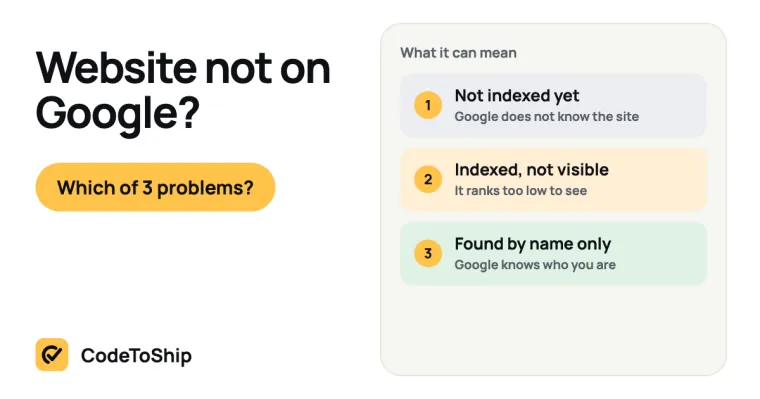
You do not have to apply to be listed on Google, and it costs nothing.
- Google finds sites by following links and reading sitemaps
- You can make sure it can find you and has no reason to skip you
- After that, a new site mostly needs time and a few real links
To check the page-side blockers on your own site, you can run the free audit. It reads your robots.txt and sitemap and reports a noindex rule if one is on the page. The free report lists the first three fixes.
Which problem you have
You search for your business and it is not there. Three different situations sit behind that, and each has its own fix.
Google does not know your site yet. It has not indexed your pages, so nothing can show.
Google knows your site but does not show it for what you search. The pages are indexed and rank too low to see.
Google shows your site only when you search your own name. It knows who you are, but not what you offer.
Most people with a new site are in the second or third situation and think they are in the first. The check below settles it in two minutes.
Do you have to submit your website to Google?
No. Google says that if your pages are properly linked, it can usually discover most of your site on its own. A sitemap still helps in two cases Google names: a large site, and a new site with few links from other sites, because Googlebot finds pages by following links from pages it has already crawled. If you use a CMS such as WordPress, Wix or Blogger, Google says it is likely your CMS has already made a sitemap available.
So "submitting" really means two small things: telling Search Console the site is yours, and giving Google your sitemap address.
Step 1: add your site to Search Console
Search Console is Google's free tool for site owners. Add your site and verify that you own it when it asks. Then, under Sitemaps, enter the address of your sitemap, often /sitemap.xml. A sitemap helps Google find your pages. Google is clear that it does not guarantee every page in it gets crawled or indexed.
Step 2: check what Google already has
Search Google for site:yourdomain.com with your own address. Google's help page for the Page indexing report suggests this as the quick check for small sites. It shows a sample of the pages Google knows about, not a full count. To check one page, paste its address into the URL Inspection tool in Search Console. It tells you whether the page is indexed and, if not, why.
Does a site: search show pages from your site?
Google has nothing yet. Go to the next section.
Google knows your site. Is it visible for the words you care about? See the section on pages that are there but hidden.
Is the site only a few days old?
Check what blocks Google, below.
Wait. Google says crawling takes a few days to a few weeks.
Step 3: if Google has nothing, check these in order
Start with age. Google says crawling can take anywhere from a few days to a few weeks, and that asking for a crawl does not guarantee your page will be included, instantly or at all. If the site is older, look for something telling Google to stay out.
A noindex rule. It is a
<meta name="robots" content="noindex">tag in the page's head, or anX-Robots-Tag: noindexheader. Once Google reads either one, it drops the page from results. On WordPress, the setting "Discourage search engines from indexing this site" does this for the whole site, and it is often left on after a build.A robots.txt file that blocks Googlebot. Google's documentation adds a catch: if a page is blocked by robots.txt, Google never reads its noindex rule, so the two do not work together the way people expect.
No way to find the page. A page with no links to it and no sitemap entry is easy to miss. Link to it from your menu or from another page.
Then paste the address into URL Inspection. It shows the reason. Request indexing once if the page is new. Google notes that there is a quota and that asking again for the same page does not make it crawl any faster. If the reason is "Crawled, currently not indexed" or "Duplicate without user-selected canonical", each has its own guide: crawled, currently not indexed and duplicate without user-selected canonical.
Step 4: if Google has your pages but you still do not see them
Indexed does not mean visible. Google decides the order of results, and an indexed page can sit on page five. Two quick tests tell you where you stand:
- Search your business name. If you appear, Google knows who you are.
- Search the words a customer would type, like "web designer in your city" or the exact problem you solve. If you do not appear there, it is a ranking problem, not an indexing one.
Ranking has no one-step fix. What helps, roughly in this order:
One page for one clear question. A page that answers a narrow problem has a better chance than a home page trying to cover everything. Google's Search Essentials ask for helpful, people-first content that uses the words people search for in prominent places such as the title and main heading.
Links from other real sites. A new site has few, which is the main reason new sites sit low. Be useful in communities where your customers already ask questions. Do not buy links.
Time. New sites rarely rank for competitive terms in their first weeks.
What our own numbers look like
Our first impression in Search Console was on October 7, 2026. In the 37 days to November 12, it shows 130 impressions and 4 clicks for codetoship.com. One guide, about a narrow problem, holds 80 of those impressions and sits near the bottom of page one. For broad terms like "site audit", our pages show at positions 70 to 100: indexed, but far from visible. That is the second situation, and it is normal for a site this young. It is why we write for narrow problems first.
How long does it take?
Google says crawling can take a few days to a few weeks, and that requesting a crawl does not guarantee inclusion. Getting indexed and ranking well are separate: the first can happen in days, and the second takes much longer on a new site with few links.
Using WordPress, Wix, Shopify or Squarespace
Google says that on a hosted content platform, the platform usually submits new content to search engines for you, and that many CMSes make a sitemap available without any work from you. Check your platform's support pages for a setting that hides the site from search engines, which is the most common reason a finished site stays invisible. Then follow the same steps: Search Console, a sitemap, and the site: check.
What does not help
- Requesting indexing again and again. Google says it does not make the crawl faster.
- Paying someone to get you on Google. Google says it does not cost any money to appear in Google Search results.
- Changing titles and descriptions every few days. Give a change time to be recrawled.
Quick reference
| What you see | Most likely situation | Check first |
|---|---|---|
| A site: search shows nothing and the site is days old | Not indexed yet | Wait, add Search Console, submit the sitemap |
| A site: search shows nothing and the site is weeks old | Something blocks Google | noindex, robots.txt, URL Inspection |
| Pages show, your name finds you, other searches do not | Ranking, not indexing | One page for one question, links from other sites |
| Some pages show, one important page does not | That page is excluded | URL Inspection on that page |
Questions people ask
Does Google charge to list my site?
No. Google's Search Essentials say it does not cost any money to appear in Google Search results, no matter what anyone tries to tell you.
Why does my business name show but my service does not?
Google has indexed you and knows your brand, but your pages are not yet strong enough to rank for the words your customers use. See the section on pages that are there but hidden.
Is my website indexed by Google?
Search Google for site: followed by your address, and use the URL Inspection tool in Search Console for a single page. The first shows a sample of the pages Google knows about, not a full count.
Why is Google not indexing my site when I submitted a sitemap?
A sitemap helps Google discover your pages, but Google says it does not guarantee that every page in it gets crawled or indexed. Check for a noindex rule and a robots.txt block, then read the reason URL Inspection gives.
Can I make Google show my site faster?
You can make sure nothing blocks it and give it a sitemap. After that, the speed is Google's. Google says asking again for the same page does not make it crawl any faster.
How the audit helps, and what it cannot see
- The audit reads one page and your site's robots.txt and sitemap. It reports a noindex rule in the page's meta tag or in the X-Robots-Tag header if it finds one.
- It does not read Search Console, so it cannot say whether Google has indexed a page, when Google last crawled it, or why it was left out.
- It does not know where your site ranks for any search.
- The free audit shows the score, the grade and the first three fixes.
Check the blockers on your own site
Paste your address into the free audit. For the wider set of checks, see the technical SEO audit checklist. If your site is live but your logo does not show next to your result, see website logo not showing in Google.
Sources and when they were read
- Google Search Central, Ask Google to recrawl your URLs (read November 15, 2026): crawling takes a few days to a few weeks, no guarantee of inclusion, the request quota, and that platforms often submit for you.
- Google Search Central, Learn about sitemaps (read November 15, 2026): when a sitemap helps, and that it does not guarantee crawling or indexing.
- Google Search Central, Block Search indexing with noindex (read November 15, 2026): the meta tag and the header, and that a robots.txt block hides the rule.
- Search Console Help, Page indexing report (read November 15, 2026): the site: check for small sites, and that it shows a sample.
- Google Search Central, Google Search Essentials (read November 15, 2026): helpful content, crawlable links, and that appearing costs no money.
- The numbers about our own site are from Search Console, read on November 15, 2026 (data to November 12).